RiskDeck for MetaTrader 5: user guide
For RiskDeck 2.2 · updated 13 November 2026
Trade fast. Risk handled. RiskDeck is a trade manager, not a robot: it never opens a trade on its own, and we make no profit claims. This guide describes every feature and setting. New here? Start with sections 2 and 4: installation and your first trade.
RiskDeck shows its words in English, and this guide quotes them exactly as they appear on your screen, in this style: CONFIRM. A path through the settings is written like this: Risk › Max risk per trade.
Safety first
- RiskDeck starts live:
CONFIRMsends a real order to your broker. Nothing is sent without yourCONFIRM. On the first start a bar says so:CONFIRM sends real orders. To practise, set Trade gateway to Simulated (F7). - Two locks sit in the EA's inputs (F7):
Trade gatewaymust beLive - real orders (still needs arming)andArm live gatewaymust betrue. Both are open when RiskDeck is installed. - To practise, set
Trade gatewaytoSimulated - nothing is ever transmitted. The header shows□ MOCKand nothing reaches your broker. InMOCK, RiskDeck's own closes and stop moves are simulated too; stops already at your broker stay there.
What RiskDeck will never do:
- change a position it doesn't own, until you take it over with
ADOPT; - remove a stop you placed;
- show a risk it can't measure as
$0.00- it saysUNKNOWN, or shows?; - move a stop away from the price - its automation only moves a stop toward it;
- trade on its own, or promise a result. It keeps the limits you set; the decisions stay yours.
RiskDeck runs inside MetaTrader 5. When the terminal is closed, nothing is checked or managed.
Install and attach
You need MetaTrader 5 and a hedging or netting account. RiskDeck is bought, installed and updated through the MQL5 Market.
- In MetaTrader 5, open the Market tab of the Toolbox, then Purchased, and click Install next to RiskDeck. It appears in the Navigator, under Expert Advisors › Market.
- Click Algo Trading on MetaTrader's toolbar so that it shows as on. Until you do, the panel header shows
□ ALGO OFFand nothing is sent. - Drag RiskDeck from the Navigator onto the chart of the symbol you want to trade. On the Common tab, tick Allow Algo Trading, then click OK. The panel appears on the chart.
Everything else is set in the panel, not in F7. All charts of one account share the same settings (section 13).
Updates are free for buyers. MetaTrader tells you when one is out, and you install it from the Market tab. The last line of the Settings menu shows your version, for example RiskDeck 2.2.
The panel
At rest, the panel shows:
- Pair - the symbol of this chart. Click it to open the pairs sheet and switch to another pair (section 13).
- Status pill -
● SAFEwhen nothing is open,♦ 2when RiskDeck manages two positions, a red pill when a limit blocks the account. - Fold
^- folds the panel down to the header and the day bar. RiskDeck remembers it after a restart. - Menu
≡- opensSettings. BUYandSELL- each opens a plan. Nothing is sent yet.- Day bar -
DAILY LIMIT: today's closed loss plus what the stops of your open positions and pending orders could still lose, against your daily limit;OPEN RISK: how much you would lose if every stop were hit now;resets in …: time until the next trading day. WhileCommission per lot, round turnis not set, both figures carry+ ?: the sum leaves the commission out. - Footer - a mark appears here whenever protection is weaker than RiskDeck's default (section 11).
RISK PER TRADEand the risk chipsEntryStopTargetProtectionfor this trade- Facts:
LOT,MARGIN,SPREAD,REWARD CONFIRMshows what the trade loses at its stop
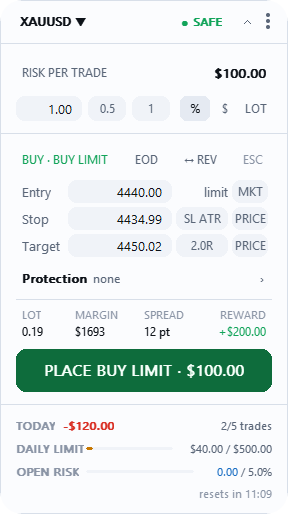
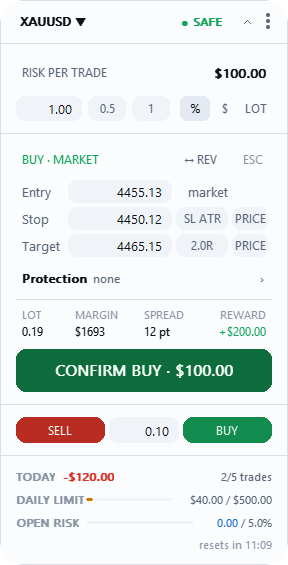
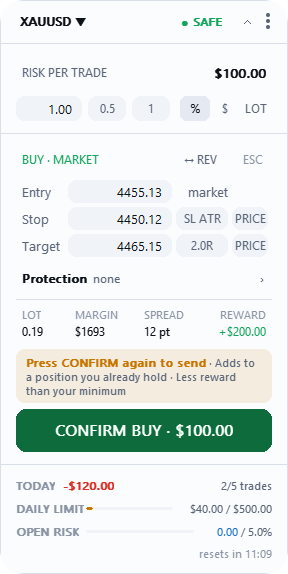
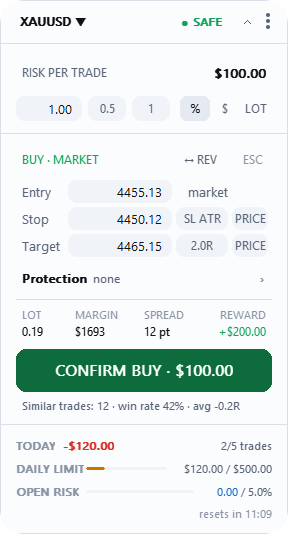
In a plan you see RISK PER TRADE with the risk chips, Entry, Stop and Target, the Protection row, a row of facts (LOT, MARGIN, SPREAD, REWARD), and CONFIRM. The button shows your risk to the stop before you press it: CONFIRM BUY · $100.00, with the commission you enter. Swap and slippage come on top. Under CONFIRM a grey line shows your own similar trades (section 12).
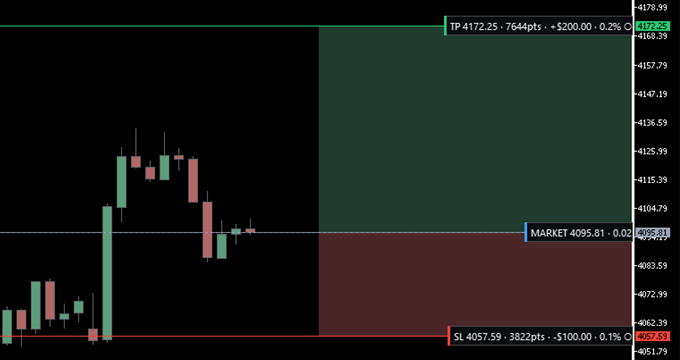
Every line on the chart has a label with a thin coloured stripe on its left: red for the stop, green for the target, blue for the entry, dashed blue for a partial, dashed purple for break-even. You can drag the lines.
Keys. With no plan open, B opens a BUY plan, S a SELL plan, and Enter a plan on the side the panel shows. Esc closes a plan or a sheet. No key sends an order: only CONFIRM sends.
Your first trade
Three settings first. Open the menu ≡, then Settings.
- Commission.
Risk›Commission per lot, round turn: what your broker charges for opening and closing one lot, in your account currency. At $3.50 a side, type7. Type0only if your account really has no commission. - Risk per trade.
Risk›Default risk per tradeis where every new plan starts:1.00%unless you change it. It can't go aboveMax risk per trade(2.00%unless you change it). - Daily loss.
Account protection›Daily loss: how much the account may lose in one day. It starts at3.00%of your balance at the start of the trading day. When the day reaches it, the header shows■ DAILY LIMIT. With theLimits dialonGuard(the default) orHold, new trades are refused until the day resets; onWatch, RiskDeck only warns.
The trade.
- Press
BUYorSELL, or the keyBorS. A plan opens with an entry, a stop and a lot worked out from your risk. Nothing is sent yet. - Place the stop: drag the stop line on the chart, or type it. The lot changes; the risk stays the same.
- Set a target if you want one: the target pill steps through
off→1.0R→1.5R→2.0R→3.0R. - Read the button.
CONFIRM BUY · $100.00is your risk to the stop, with the commission you entered. Swap and slippage come on top. - Press
CONFIRM. The order goes to your broker, and a line above the day bar says what happened.
Your position now has its own card, with its result in money and in R (section 8). To close a plan without sending, press Esc. If CONFIRM shows a title instead of an amount, the plan can't go out as it stands: section 6 says what each title means.
Planning a trade
Risk. A plan risks a share of your account, an amount of money, or a fixed number of lots. RiskDeck works out the lot from your risk and the distance to your stop, with the commission you set. A pair you've never set up starts at Default risk per trade (1.00%); a pair you've used before starts from its last risk. Each pair remembers its own plan.
Commission. Risk › Commission per lot, round turn is the commission for opening and closing together: if your broker charges $3.50 a side, type 7. Until you type it, the plan shows an amber bar Commission not set and the lot is sized without commission; CONFIRM still sends. 0 means a real zero.
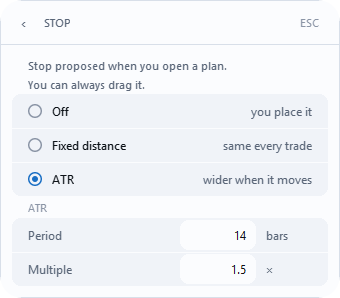
The stop RiskDeck proposes. Risk › Stop decides whether a new plan comes with a stop already in place:
Off- you place it yourself;Fixed distance- the same distance every time;Distancestarts at20pips;ATR(factory) - the distance follows how much the market is moving;Period14,Multiple1.5.
Pips and percent. With Fixed distance, on forex 20 means 20 pips; everywhere else it means 0.40% of the instrument's price, and the stop chip says SL 0.40%. Twenty pips mean something different on every market; a percentage of price reads the same across them. Distances on the chart are in pips (p) on 3- and 5-digit quotes, and in points (pts) elsewhere, for example gold or indices.
Three floors under every stop. A stop never sits closer than, in this order: the broker's minimum distance; three spreads; the current price - if the market has already moved past the proposed distance, the stop goes to a safe minimum from the price now, and a note says so.
Markets not yet checked by eye. RiskDeck works on any symbol your broker offers and has been checked by eye on XAUUSD, BTCUSD, US30 and NAS100. On a class not yet checked, such as energy, stocks or exchange-traded contracts, an amber bar says Not checked on this market, for example Stop and size not checked by eye on energy - check size before sending. It's a warning; CONFIRM still sends, and × puts the bar away.
Target. The pill steps through off → 1.0R → 1.5R → 2.0R → 3.0R → off. The amount on the target label is what really reaches the target, after the partials you close before it.
The facts row. LOT, MARGIN, SPREAD (amber when unusually wide) and REWARD. Amounts in USD, EUR, GBP and JPY carry their sign; any other currency has its code after the number (1250 PLN). ↔ REV turns a BUY plan into a SELL plan and back.
Pending orders. A plan can also be a limit or a stop order. The button then says, for example, PLACE BUY LIMIT · $100.00.
Protection for this trade. The Protection row sets, for this trade only and before you send, when the stop moves to break-even and where the partial closes happen (section 9).
Netting accounts. On a netting account one symbol holds one position. A plan against your open position shows an amber bar ▲ NETTING that says what will happen, for example This is a netting account: SELL 0.40 will REDUCE your open BUY 0.79 to 0.39, not open a second position. On a symbol with an open position, RiskDeck doesn't send an order without a stop, because MetaTrader would remove the stop of the whole position.
When CONFIRM says no
When a plan can't be sent, RiskDeck says why on the CONFIRM button itself, in place of the amount, and as the title of the bar under the risk, with the numbers from your plan.
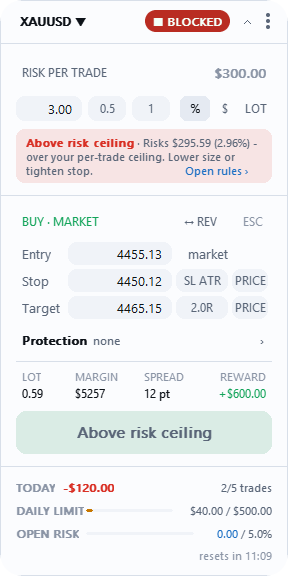
Above risk ceiling- the trade risks more thanMax risk per tradeor your open-risk ceiling. Lower the size or bring the stop closer.Not enough margin- lower the size.Below the minimum lot- raise the lots, or size by risk instead.Risk is not set- type the risk.Symbol data unusable- the broker gives no usable price right now; try again in a moment.Risk not verified- the broker's own calculation doesn't confirm this size; nudge the stop or the risk.No stop loss- type a stop, or let the stop proposal set it.Stop too close- move the stop further out.Stop on the wrong side- aBUYprotects below its entry, aSELLabove it.Stop at the entry- move it away from the entry.Stop can't be placed- at this price the stop would sit at or below zero; type a closer one.Target on the wrong side- a target you froze on the chart is now on the wrong side of the entry; drag it past or unfreeze it.
When the broker's smallest lot is too big. If even the smallest lot your broker sells risks more than you typed, the bar's title is Smallest lot risks more, and the bar says by how much, for example Stop too wide for XAUUSD: the broker's smallest lot risks $150.00 - 1.5x your ask.
When the market is closed. If this pair's market is closed, or your broker takes no new orders on it, the bar says Market is closed or No trading here and ends with Open pairs ›: the pairs sheet, where another pair may be trading.
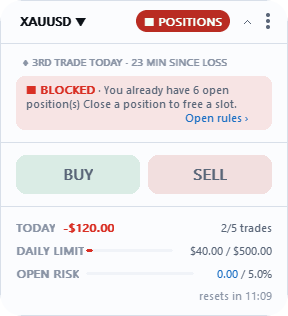
A blocked panel still plans. When a limit has blocked the account, BUY and SELL are dimmed but still open a plan, so you can work the numbers out. Only CONFIRM and QUICK refuse.
Quick entry
QUICK is a row under the plan - SELL │ lot │ BUY - that sends a market order of the size you typed, with no stop. It's off by default; switch it on in Risk › Quick entry, and RiskDeck asks you to confirm.
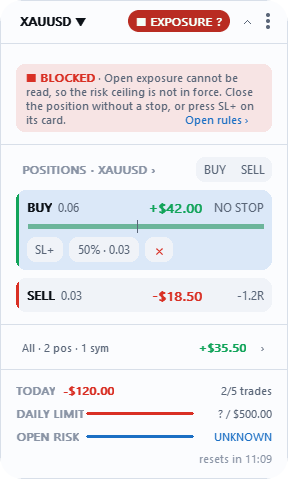
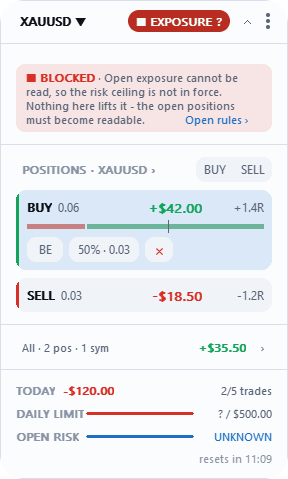
Because a trade without a stop can't be measured, its risk shows as unknown, never as $0.00, and one quick entry blocks new positions: the header shows ■ EXPOSURE ? until you close it or press SL+ on its card.
Managing a position
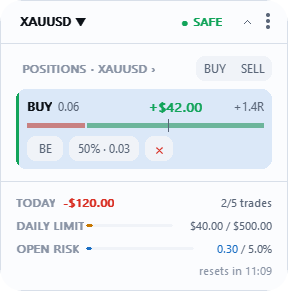
The card. Each position has a card with its result, its R and a scale from the stop on the left to the target on the right - red from stop to entry, green from entry to target. After break-even the whole scale turns green.
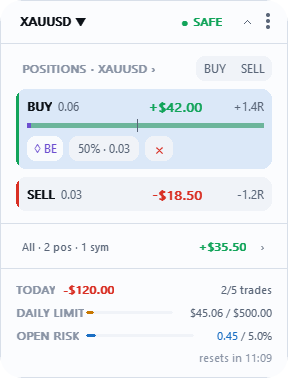
Buttons on the card:
BE- moves the stop to the entry, plus your commission;50%/25%- closes that part of the position; the chip shows the lots it will close, for example50% · 0.27;×- closes the position;SL+- puts a stop on a position that has none;ADOPT- takes a position you opened by hand under RiskDeck's management;NEW R- measures R again after the position changed without RiskDeck;TRAIL- shows who moves the stop: blue, automation is trailing; amber, you moved a trailed stop by hand and trailing waits; grey, the stop is yours.
These buttons keep working when the connection is down; only new orders wait. On a position RiskDeck doesn't manage yet, they answer Not a RiskDeck trade: press ADOPT first.
Your result in R counts swap and commission. The card, the position bar on the chart, the R column in ALL POSITIONS and the SL/TP pills show the same R.
A position without a stop. A RiskDeck position with no stop shows NO STOP, and new trades are blocked until it has one: close it, or press SL+. A position without a stop opened by hand or by another EA only warns.
NEW R. If a RiskDeck position changes without RiskDeck - you added to it by hand, for example - the card says Position changed · automation paused. Press NEW R once to see the old and new 1R, and again to use it.
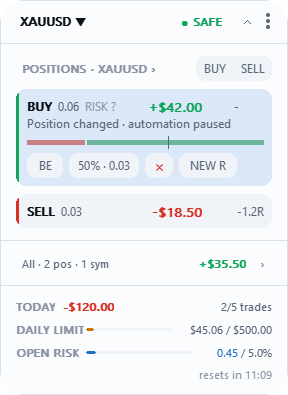
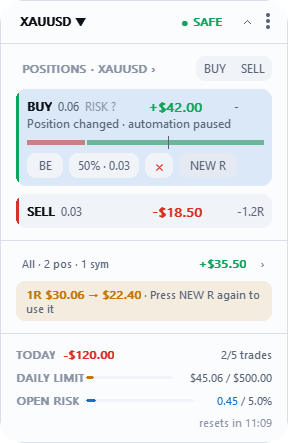
Positions opened outside the panel count toward your open risk and your limits once the terminal lists them. RiskDeck doesn't manage them until you press ADOPT.
Automation: break-even, partials, trailing, close position
All of it ships off. Nothing moves on its own until you switch it on in Trade management › Automation. Then four rows appear: Break-even, Partials, Trailing and Close position, each with its own switch.
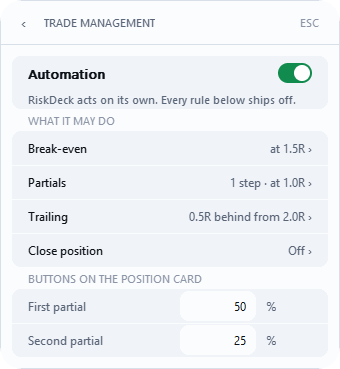
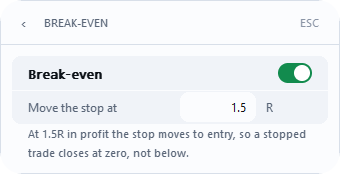
Break-even. When the trade is Move the stop at R in profit (factory 1.0), the stop moves to the entry, plus your commission. It covers commission only if Commission per lot, round turn is set, and it doesn't add the spread.
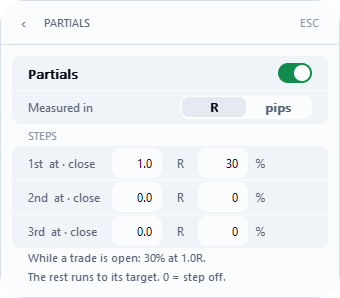
Partials. Up to three steps close part of the position: 1st at · close (factory 1.0 R, 25 %), 2nd at · close (2.0 R, 25 %), 3rd at · close (off). Measured in R or pips. Shares are of the volume you opened with and together can't exceed 100%. 0 switches a step off.
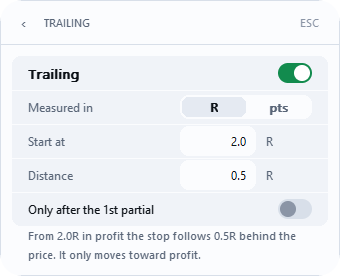
Trailing. Once the trade is Start at in profit (factory 1.0 R), the stop follows the price at Distance (factory 0.5 R). Measured in R or pts. It only ever moves toward profit. Only after the 1st partial makes it wait for a partial.
Levels count the price's path. Break-even, partials and trailing count the distance the price has travelled, in stop distances. Your result in R on the card counts costs too, so the two can differ a little.
The card's partial buttons. First partial (factory 50 %) and Second partial (25 %) set what the two buttons on a card close - a share of what is open now.
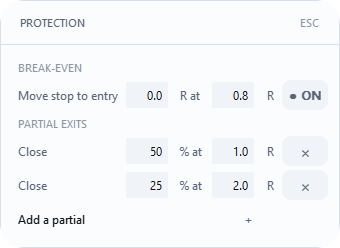
This trade only. The plan's Protection row opens the PROTECTION sheet: BREAK-EVEN and up to three PARTIAL EXITS for this trade only, before you send.
Close position. The last row of Trade management. A switch and two figures: Close at in R, and Close at amount in your account currency, the floating result with swap. Each new position closes in full at whichever comes first. The figures apply to every position opened after you set them; switching it on closes nothing that is already open, and a plan sent with automation off doesn't carry them. While Commission per lot, round turn is not set, the amount leaves commission out, and the Close position row on Trade management shows the amount with + ?. An unknown R never closes: the position stays open, and the log says once R unknown - this position will not close at its figures. It closes at market price, so a gap or slippage can go past the figure, and a closed terminal closes nothing.
When automation waits. While the terminal is offline, or while □ NOT ARMED, □ ALGO OFF or □ NO TRADING is showing, automation stands still. When the way opens, it takes every level the price passed meanwhile in one go.
All positions and orders
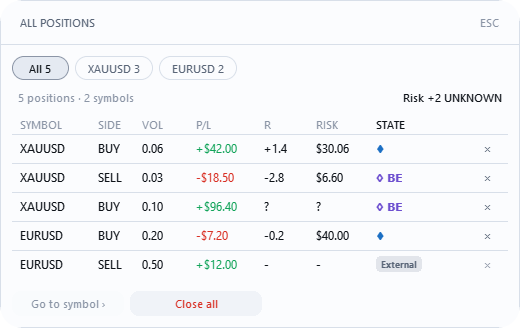
ALL POSITIONS shows every position on the account; ALL ORDERS every pending order. Open it by clicking the positions header on the panel, for example POSITIONS · XAUUSD ›. With positions on more than one pair, chips filter them, and Close all becomes, for example, Close 1 XAUUSD. In ALL ORDERS, Cancel all mine cancels only RiskDeck's orders and those you took over with ADOPT; orders placed by hand or by another EA stay.
Account protection
This is the part of RiskDeck that refuses rather than advises: Account protection in Settings.
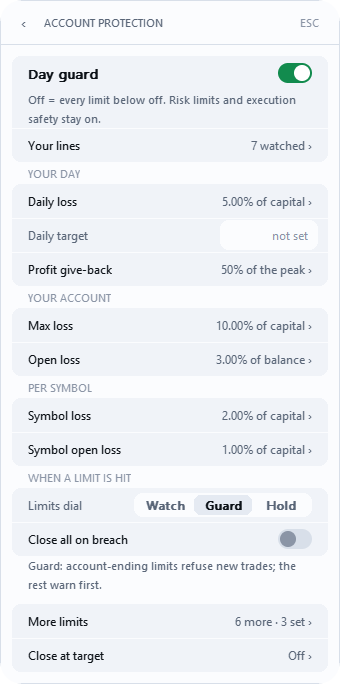
0 means off, and the row says no limit. The number is the switch.
Day guard at the top switches the whole page. Off means no limit on this page works; your risk limits and execution safety keep working.
Limits dial - how firmly RiskDeck reacts:
Watch- every limit tells you; none refuses a trade.Guard(default) - a limit that ends the account refuses new trades; the rest warn first. It also refuses on trades a day, positions at once, cooldown and total open risk.Hold- every limit refuses new trades.
The limits:
Daily loss(factory3.00% of the day's start balance) - what the account has lost since the trading day began. Blocks until the day resets, or until you lift the block.Daily target- the day's profit after which RiskDeck says "enough". WithClose all at Daily targeton, it also closes (see Close at target below).Profit give-back ›(underDaily target) - when you give back the share of today's best profit you set inMax profit give-back, there are no new entries until the next trading day. Your open positions stay open.Give-back counts fromsets the profit from which it starts counting. The block cancels RiskDeck's own pending orders; your manual ones and another EA's stay.Close all on breachdoesn't apply to it.Max loss- the drawdown of the whole account; lifts when equity is back above the line.Open loss- the floating loss on the account; lifts when you close or reduce a position.Symbol lossandSymbol open loss- the same for one instrument; they always count the worst instrument, never the average.Currency risk limit(on theSymbol open loss ›page) - the risk to the stop of all positions on the same side of one currency, across all your symbols: long EURUSD and long GBPUSD are one bet against the dollar. OnGuardandHoldit refuses a new trade over the limit; onWatchit warns. It closes nothing.- On
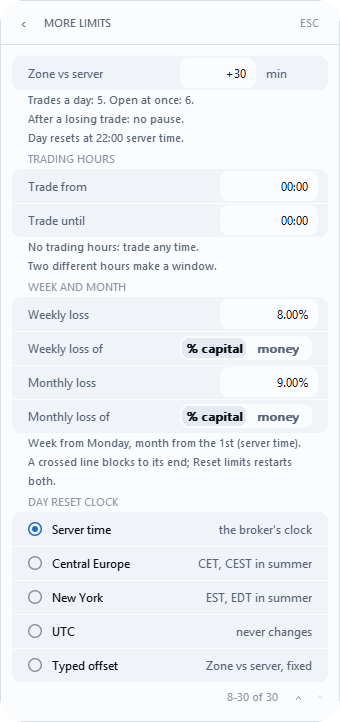
More limits:Max trades a day,Max positions at once,Cooldown after a loss,Weekly lossandMonthly loss, and your trading hours,Trade fromandTrade until.
Week and month. Weekly loss and Monthly loss count from the start of the week and of the month. Once a line is crossed, there are no new trades until the next week or month, even if equity comes back. The next period or Reset limits lifts it; Lift today's block doesn't.
Trading hours. Outside the hours you set in Trade from and Trade until, there are no new entries and the header shows ■ OFF HOURS; closing, stops and break-even still work. The hours follow your computer's clock. Two equal hours (factory 00:00 and 00:00) mean no window.
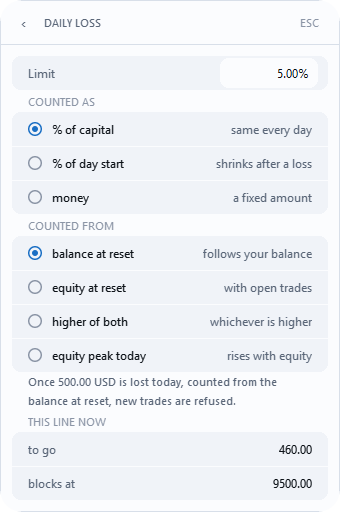
Percent means different things. Daily loss counts % of capital (the same line every day) or % of day start (shrinks after a loss); Open loss counts percent of the current balance; Max loss and the symbol rules count percent of Starting capital. Not sure? Choose money and type the amount.
What the line is counted from. Daily loss › COUNTED FROM: balance at reset (default), equity at reset, higher of both, equity peak today. Max loss › MEASURED FROM: starting capital (default), highest EOD balance, highest equity ever. equity peak today and highest equity ever tighten by themselves, so you can be blocked while in profit. RiskDeck only sees the peaks that happen while the terminal with RiskDeck is running.
Starting capital (on More limits) is the base for Max loss and the symbol rules. Left at start balance, it takes the balance from the first time RiskDeck ran on the account.
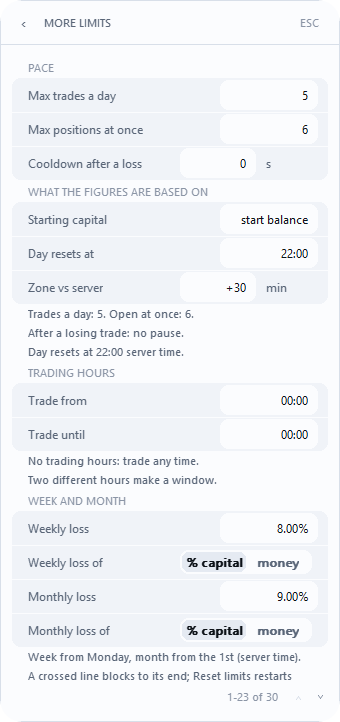
When the day resets. Day resets at sets the hour a new trading day begins, and Zone vs server how far your zone is ahead of the broker's server, in minutes. Day reset clock chooses the clock: Server time (default), Central Europe, New York, UTC, or Typed offset, a fixed number of minutes from Zone vs server. The named zones follow their own clock changes. Changing any of these never cuts the current day short.
A limit below what's already lost is refused: the field goes back to the previous number and says, for example, 400.00 is lost already.
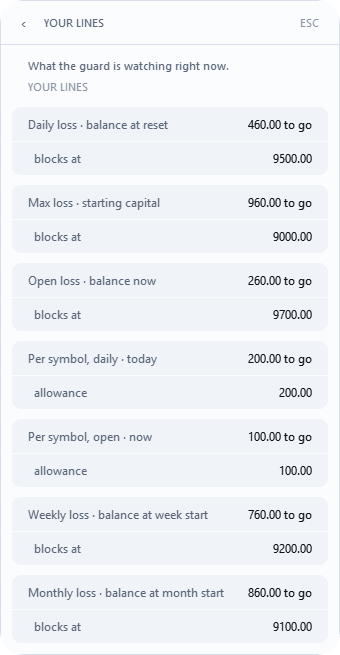
YOUR LINES (the Your lines › page) is a reading, not a setting: for each working rule, how much room is left and at what equity it blocks. A ? never means zero - it means RiskDeck can't count it, usually because a position has no stop.
When a limit is hit, the panel says it three ways at once: a pill, a sentence, and advice. For example ■ DAILY LIMIT (blocked until the day resets), ■ MAX LOSS, ■ WEEKLY LIMIT, ■ GIVE-BACK, ■ OPEN LOSS, ■ SYMBOL LIMIT, ■ TRADES TODAY, ■ COOLDOWN. The full list of pills is in section 16.
■ NO ROOM warns before, not after. RiskDeck works out where the account would end if every one of your stops were hit, and refuses a trade before that can happen. It closes nothing. Limits count from your stops: a price gap or slippage can take a loss past a limit.
Lifting today's block. While the day is locked, Lift today's block appears at the top of Account protection. It asks you to confirm, then lifts the lock on every chart of the account. The same row lifts ■ GIVE-BACK. The footer then says BLOCK LIFTED TODAY. It doesn't lift the weekly or monthly limit.
Close all on breach (off by default). With it off, a limit only stops new orders. RiskDeck's own pending orders are cancelled at every breach of the daily, weekly or monthly limit, Max loss or Open loss, even with it off. With it on, RiskDeck closes RiskDeck's and your manual positions at the daily, weekly and monthly limit, Max loss and Open loss, and cancels your manual pending orders - only the ones that existed at the breach; one you place afterwards stays. It never touches another EA's positions. It closes once per breach, even if the block lasts several days. After Open loss closes, the day isn't blocked and the close isn't used up for the day: it re-arms once the open loss drops back under the limit by at least 10% of it (with a 2,000 USD limit, to 1,800 USD or less) and the day's line is clean. Until then, another breach stops new orders but closes nothing. With it off, your manual pending orders stay with the broker and can still fill; cancel them in ALL ORDERS if you don't want them.
Close at target. The last row of Account protection opens a page with two settings. Both are off by default; after an update nothing closes by itself.
Account target- an equity amount. When equity reaches it, RiskDeck closes once whatClose all on breachcloses: RiskDeck's and your manual positions on the whole account, and it cancels your manual pending orders. Another EA's positions and orders stay. It works withClose all on breachoff too. New entries then stay blocked until you change or clear the amount: the pill■ TARGET, the barAccount target reachedwith the target amount, andChange or clear Account target to trade again.An amount at or below equity now is refused:Account target must be above equity now. The amount is the equity in your terminal minus broker credit.Close all at Daily target- a switch forDaily target. You type the figure in theDaily targetrow; without one the page saysDaily target not set - this switch closes nothing yet.Off, the day's target only warns, as before. On, at the target, counted without credit and deposits, RiskDeck closes once the same as above and blocks new entries until the next trading day:■ TARGET,Daily target reachedandResets next trading day.If the day's gain is already past the target, switching it on is refused (Day's gain is past the Daily target now): raise the figure first.
Once per target. A restart, a second chart or equity crossing back don't close a second time. If the broker doesn't close a position, RiskDeck retries and says Retrying until they close - change or clear the target to stop. (for Daily target: Retrying until they close - turn Close all at Daily target off to stop.) With Algo Trading off or no connection, the target waits and closes later only if equity is still at the target. On Watch both targets only tell you.
What a target won't do. A closed terminal closes nothing. A target closes at market price, so a gap or slippage can go past it and the result can differ from the amount. Daily target also counts the floating result of positions opened before the day reset, so a position held overnight can reach the day's target with a small move of the new day.
Weaker than default. Whenever a protection is set lower than RiskDeck ships it, the day bar's footer says so and the mark can't be dismissed: GUARD OFF, SL OPTIONAL, LIMITS WARN ONLY, NO DAILY LIMIT, NO OPEN RISK CAP, BLOCK LIFTED TODAY, or PROTECTION REDUCED for two or more. For two hours after Reset limits it says LIMITS RESET AT 14:05, unless a mark of weaker protection is showing (SL OPTIONAL alone doesn't count). A position without a stop takes the footer before any mark.
Deposits and withdrawals aren't the day's result: they move the day's line by their own amount. Broker corrections and bonuses booked to the balance count the same way. Broker credit (the separate Credit item in MT5, part of equity but not of the balance) doesn't move the line: the limits measure equity minus the credit at that moment, so credit gives no extra room for a loss, and getting it or losing it is neither a gain nor a loss for the day. This applies on an account where RiskDeck started on 2.2, or after Reset limits. After an update from an older version, credit still counts like a deposit. If the panel refuses trades on a flat account that has credit, use Reset limits once. Fees and commissions count toward the day. Daily loss is measured on equity, so swap counts the moment the broker books it.
Second Brain, news and Similar trades
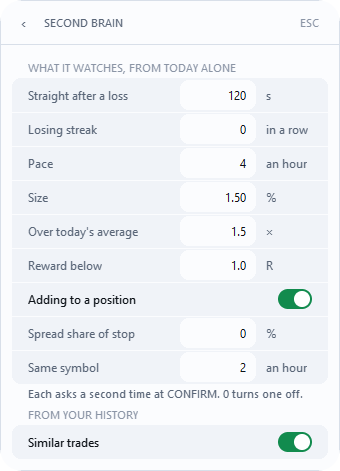
Second Brain is the switch at the top of Settings: Asks twice before a risky trade. Never refuses. It ships on.
When a plan looks risky for you, the first CONFIRM shows an amber frame that starts with what to do, then the reasons - for example Press CONFIRM again to send · Adds to a position you already hold · Less reward than your minimum - and a second press within 8 seconds sends. If you change the plan in between, it asks again. It never refuses and never changes your size. It looks at today only. QUICK asks too, about a recent loss, a losing streak, your pace and the same symbol.
What it watches (What it watches ›, factory 7 of 9 set; 0 switches a check off):
Straight after a loss- a plan within120s of a losing close;Losing streak- this many losses in a row (off);Pace-4or more trades in the last hour;Size- the plan risks1.50% of capital or more;Over today's average- after a loss, more than1.5× today's average risk;Reward below- the target gives less than1.0R;Adding to a position- you already hold this symbol in the same direction (on);Spread share of stop- the spread is at least this share of your stop distance (off);Same symbol-2or more trades on this symbol in the last hour, so it asks at the third.
Above BUY and SELL a line of facts about your day says, for example, ♦ 3RD TRADE TODAY · 23 MIN SINCE LOSS.
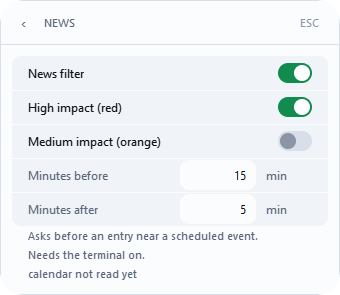
News. Settings › News. Near a scheduled event in MetaTrader's economic calendar, for the currencies of your symbol, CONFIRM and QUICK ask a second time and name the event, for example High-impact USD news at 14:30 · Non-Farm Payrolls. The time is your computer's. It never refuses and doesn't touch open positions. It has its own switch and works with Second Brain off. Rows: News filter (on), High impact (red) (on), Medium impact (orange) (off), Minutes before (15), Minutes after (5). The page says Asks before an entry near a scheduled event. Needs the terminal on. and lists the next events, or calendar unavailable when the terminal gives no calendar. If the calendar doesn't answer, for example when the terminal has no link to MetaQuotes, RiskDeck tries again after 30 minutes, then after 1 hour, 2 hours and every 4 hours after that. A read that works brings back the usual check every 5 minutes. The panel can stop for about a minute at start and at each of these tries. It doesn't work in the Strategy Tester.
Similar trades. While a plan is open (after BUY or SELL), a grey line under CONFIRM shows how your own closed trades on the same symbol and in the same direction went over the last 365 days, up to the 100 most recent: Similar trades: 12 · win rate 42% · avg -0.2R. Results are profit plus commission, swap and broker fees. The average R appears once at least 5 of those trades have an R. With fewer than 5 similar trades the line says Fewer than 5 similar trades so far.; while the history isn't loaded it says Similar trades: not available yet. The numbers come from your account history in the terminal and nothing is sent anywhere. The line is information only: it never blocks a trade and never changes your plan. It shows your own history, not advice. Switch it off in Settings › Second Brain, last row Similar trades, under FROM YOUR HISTORY; it works whether Second Brain is on or off.
Several charts and symbols
All charts of one account share one settings file. One chart manages the positions and the automation; any other shows □ 2ND CHART in its header, where plans and CONFIRM work as usual. If the managing chart loses the EA, another RiskDeck chart takes over.
One account, one terminal. Two terminals logged in to the same account don't know about each other: break-even, partials and trailing could run twice on the same position, and each terminal keeps its own settings. Run RiskDeck in one terminal per account.
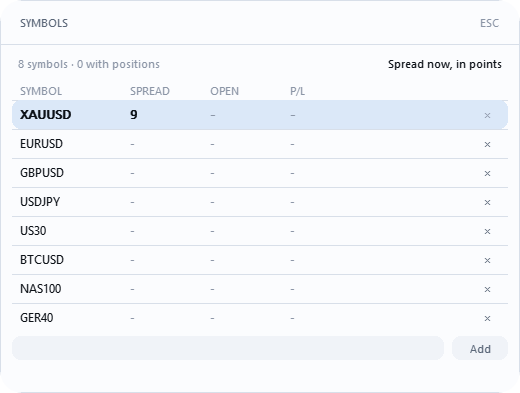
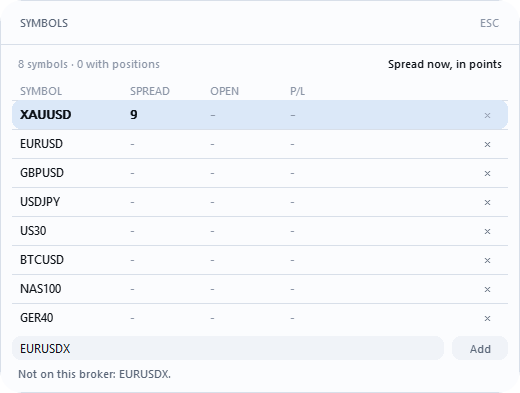
Every pair remembers its own plan. Click the pair in the header to open SYMBOLS: your pairs with SPREAD, OPEN and P/L. Click a row to switch the chart. Type a name and press Add to add a pair, or × at the end of a row to take one off; the list holds up to 32 pairs. It's the same list as Appearance › Symbols (factory XAUUSD, BTCUSD, US30, NAS100). RiskDeck matches your broker's suffix by itself and says which names your broker doesn't have.
On an MQL5 virtual hosting. Your limits live in the settings file, not in the EA's inputs. After each migration, open the virtual server's Journal and find the line settings = …: (STORED) means your own settings run, (FIRST_RUN) means RiskDeck's defaults run.
Appearance, notifications and resets
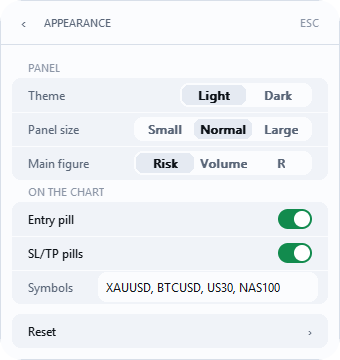
Appearance: Theme (Light · Dark), Panel size (Small · Normal · Large), Main figure (Risk · Volume · R), Entry pill, SL/TP pills, Symbols. On a chart too low for the size you chose, the panel shows itself as Small and the bottom of the Appearance page says so; your choice comes back by itself when the chart is tall enough.
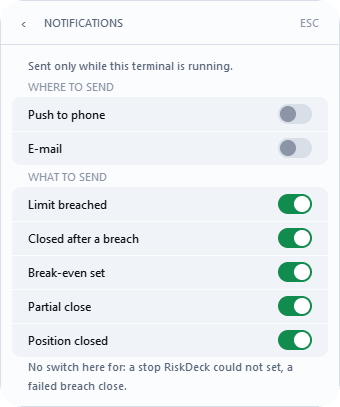
Notifications. Push to your phone or e-mail, through MetaTrader, when a limit is crossed, positions are closed after a breach, break-even is set, a partial close is done or a position is closed. The page starts with Sent only while this terminal is running. Under WHERE TO SEND, Push to phone and E-mail are both off at first; push needs your MetaQuotes ID in Tools › Options › Notifications, e-mail needs mail set up in Tools › Options › Email. Under WHAT TO SEND, five rows are on. A notification blocks nothing and closes nothing. Nothing is sent from the Strategy Tester.
Reset › opens two rows. Reset to defaults puts settings back, but leaves account protection, Max risk, Require a stop and appearance as you set them - one press can never weaken your protection. Reset limits works on every account once the terminal is connected: it lifts every block after a crossed line, including week and month, counts the day from that moment and the lines from the current balance. It never closes a position.
Settings reference
Factory values on a new installation. A number the page won't accept is refused whole, and the row says why for 15 seconds.
Risk
Default risk per trade-1.00%, not aboveMax risk per tradeMax risk per trade-2.00%; above it,CONFIRMrefuses withAbove risk ceilingMax open risk-4.00% for all open trades together;0= no capMeasured on-Balance·Equity; factoryBalanceStop ›-ATR(14) x 1.5Commission per lot, round turn-not setRequire a stop- onQuick entry- off
Trade management
Automation- offFirst partial-50%;Second partial-25%Break-even- off;Move the stop at1.0RPartials- off;Measured inR; steps1.0·25,2.0·25, third offTrailing- off;Measured inR;Start at1.0;Distance0.5;Only after the 1st partialoffClose position- off
Account protection
Day guard- onDaily loss-3.00%,COUNTED AS% of day start,COUNTED FROMbalance at resetDaily target-not setProfit give-back ›-Max profit give-back0(off)Max loss,Open loss,Symbol loss,Symbol open loss-0(off)Symbol open loss ››Currency risk limit-0(off)Limits dial-GuardClose all on breach- offClose at target ›-Account targetnot set,Close all at Daily targetoffMore limits:Max trades a day0,Max positions at once0,Cooldown after a loss0s,Starting capitalstart balance,Day resets at00:00,Zone vs server0,Day reset clockServer time,Trade from00:00,Trade until00:00(no window),Weekly loss0,Monthly loss0
Second Brain - on; thresholds in section 12; Similar trades on.
Appearance - Theme Light, Panel size Normal, Main figure Risk, Entry pill on, SL/TP pills on.
News - News filter on, High impact (red) on, Medium impact (orange) off, Minutes before 15, Minutes after 5.
Notifications - Push to phone off, E-mail off; Limit breached, Closed after a breach, Break-even set, Partial close, Position closed on.
EA inputs (F7)
Log level- InfoAuthorize overwriting an unreadable settings file- falseTrade gateway (MOCK transmits nothing)-Live - real orders (still needs arming)Arm live gateway (second lock, required for real orders)- true
Everything else is set on the panel.
Pills and bars
Header pill: ● SAFE all fine · ♦ 2 positions managed · ● SPR 52 high spread, a warning · ► WORKING an order on its way, or the first read of the account after a start · ▲ DEGRADED RiskDeck doesn't trust this symbol's market data (Untrusted data) · ▲ WARNING on Watch, a limit warns · □ 2ND CHART another chart manages · □ NO LOGIN terminal not logged in · a red pill, e.g. ■ DAILY LIMIT, the account is blocked · ○ OFFLINE no connection.
Red pills:
■ DAILY LIMIT,■ WEEKLY LIMIT,■ MONTHLY LIMIT- a loss limit for the day, week or month is crossed;■ MAX LOSS- the whole account's drawdown line is crossed;■ GIVE-BACK- you gave back the set share of today's best profit;■ OPEN LOSS- the account's floating loss reached its line;■ SYMBOL LIMIT,■ SYMBOL OPEN- one instrument's loss for today, or its open loss, reached its share;■ SYMBOL ROOM,■ NO ROOM- nothing is crossed yet, but this trade wouldn't fit under the instrument's share or under your lines;■ MANY SYMBOLS- more than 8 instruments have a position, an order or a loss today;■ TRADES TODAY,■ POSITIONS,■ COOLDOWN- trades a day, positions at once, the pause after a loss;■ OPEN RISK- this trade would take you overMax open risk;■ OFF HOURS- outside your trading hours;■ TARGET-Account targetorClose all at Daily targetclosed the account at a target; no new entries until you change theAccount target, or until the next trading day after aDaily targetclose;■ CURRENCY RISK,■ CURRENCY ROOM,■ CURRENCY ?- the one-currency limit is reached, this trade wouldn't fit, or the currency risk can't be read;■ DAY UNKNOWN- the day's result can't be read yet, usually for a few seconds after the terminal starts;■ LIMITS UNREADABLE- the limits' file can't be read;Reset limitsclears it;■ EXPOSURE ?- the total risk can't be measured, usually a RiskDeck position without a stop;■ BLOCKED- only the trade in the open plan is refused, not the account.
When nothing reaches the broker:
□ MOCK-Trade gatewayis set to simulation; F7 ›Trade gateway= Live.□ NOT ARMED-Arm live gatewayisfalse; set it totrue.□ ALGO OFF- Algo Trading is off, or RiskDeck isn't allowed to trade; the toolbar button, or F7 › Common › Allow Algo Trading.□ NO TRADING- investor login, or the broker refuses orders from EAs.
Offline. ○ OFFLINE and Offline since 14:32: automation is on hold, your stops and targets stay on the server, and levels passed meanwhile are taken once when the link returns. Manual closes keep working.
The result line above the day bar: green filled · blue order placed · red refused · amber sent, not confirmed · grey simulation, nothing sent.
Troubleshooting
CONFIRMshows a title instead of an amount - read the title and do what the bar says (section 6).BUYandSELLare dimmed - a limit blocks the account, or there's no connection; plans still open.Commission not setnext to the plan - type the round-turn figure, or0.- Blocked while in profit - the line is counted from a peak; check
COUNTED FROM/MEASURED FROM. - The stop is further than my setting - broker minimum, three spreads, or the price already moved; the note says why.
- Break-even or partials didn't happen - automation waits while offline or while a lock is closed; it catches up in one go.
Position changed · automation paused- pressNEW R, twice.?instead of a number - usually a position without a stop.- The reset counter shows more than 24 hours - you changed the reset hour or zone; today ends first.
- My manual pending order filled after the block -
Close all on breachis off; cancel them inALL ORDERS. Lift today's blockdoesn't lift■ WEEKLY LIMIT- it lifts only the day; useReset limits, or wait for the next week.- No news question near an event - the
Newspage sayscalendar unavailable, the terminal is off, or you're in the Strategy Tester. - No push or e-mail - switch the channel on in MetaTrader too (Tools › Options); the page says what is missing.
Similar trades: not available yet- the terminal hasn't loaded your history yet; RiskDeck asks again in a few seconds.
Strategy Tester and Demo Mode
You can see RiskDeck before you buy it, in the Strategy Tester. Demo Mode runs a guided route in visual mode: BUY, risk, stop, CONFIRM, the position card, Esc, 50% and BE. You can skip the tour at any time with Skip tour. In the tester the fields are read-only and the factory settings apply. News and Notifications don't work there.
Support and the diagnostics report
Send us a private message on MQL5, or write to [email protected]. When you write, tell us your RiskDeck version (the last line of the Settings menu, for example RiskDeck 2.2) and what the panel showed. A screenshot of the panel helps; crop out your account number.
If we ask for a diagnostics report:
- Open
Settings. In the last row, just above the version line,Diagnostics report, presssave. It writes one text file for support: settings, environment and the last log lines. Your account number is masked, and so is your Windows user name. - The panel says where the file went:
Report saved: MQL5\Files\RiskDeck\diagnostics\…. In MetaTrader 5, File › Open Data Folder, thenMQL5\Files\RiskDeck\diagnostics. The file is named likeriskdeck_diag_2026-11-12_1432_v2-1.txt, without your login. - Attach the file to a private MQL5 message.
If the panel says Report not saved: …, send us that sentence instead. RiskDeck deletes its reports on your computer after 90 days.
Send the report only in a private message, never in a public comment: it contains details of your account (broker, server, settings).
Index
Words from the panel and the settings, with the sections that explain them.
#
A
B
C
calendar unavailable12, 17Cancel all mine10Central Europe11Close 1 XAUUSD10Close all10Close all on breach11, 15, 17Close at9Close at amount9Close at target15Close position9, 15Closed after a breach15Commission not set5, 17CONFIRM1, 3, 4, 5, 6, 12, 13, 15CONFIRM BUY · $100.003, 4■ COOLDOWN11, 16Cooldown after a loss11, 15COUNTED AS15COUNTED FROM11, 15, 17■ CURRENCY ?16■ CURRENCY RISK16Currency risk limit11, 15■ CURRENCY ROOM16
D
E
J
Journal13
L
M
Main figure14, 15■ MANY SYMBOLS16MARGIN3, 5Market is closed6Max loss11, 15■ MAX LOSS11, 16Max open risk15, 16Max positions at once11, 15Max profit give-back11, 15Max risk14Max risk per trade4, 6, 15Max trades a day11, 15MEASURED FROM11, 17Measured in9, 15Measured on15Medium impact (orange)12, 15Minutes after12, 15Minutes before12, 15□ MOCK1, 16MOCK1money11■ MONTHLY LIMIT16Monthly loss11, 15More limits11, 15Move the stop at9, 15Multiple5
N
▲ NETTING5NEW R8, 17New York11News12, 15, 17, 18News filter12, 15NO DAILY LIMIT11no limit11□ NO LOGIN16NO OPEN RISK CAP11■ NO ROOM11, 16NO STOP8No stop loss6□ NO TRADING9, 16No trading here6Normal14, 15Not a RiskDeck trade8□ NOT ARMED9, 16Not enough margin6not set15Notifications14, 15, 18
O
P
R
S
● SAFE3, 16Same symbol12save19Second Brain12, 15Second partial9, 15SELL3, 4, 5, 6, 12, 17SELL │ lot │ BUY7Server time11, 15Settings2, 3, 4, 12, 19settings = …13Similar trades12, 15Size12Skip tour18SL8SL 0.40%5SL OPTIONAL11SL/TP pills14, 15SL+7, 8Small14Smallest lot risks more6● SPR 5216SPREAD3, 5, 13Spread share of stop12Start at9, 15start balance11, 15Starting capital11, 15starting capital11Stop3, 5, 15Stop at the entry6Stop can't be placed6Stop on the wrong side6Stop too close6(STORED)13Straight after a loss12Symbol data unusable6■ SYMBOL LIMIT11, 16Symbol loss11, 15■ SYMBOL OPEN16Symbol open loss11, 15■ SYMBOL ROOM16SYMBOLS13Symbols13, 14
T
V
Volume14